Article
The BRACE framework for business context engineering
How I connect business definitions and rules to data lakehouse evidence that people, workflows and AI agents can use.
Say a coffee promotion ends and the report shows 35% more revenue and $1,000 more gross profit on the featured bag across 20 stores than the week before. Would you ask an AI agent to recommend the same offer to 200 more?
A sales query can give the agent both numbers. The category manager also needs to know whether shoppers switched from a more profitable coffee, whether the same offer would ring up at the same price in other stores, and whether stock can arrive before the weekend rush. Any of those answers could change the recommendation.
The retailer cut the price from $20 to $18 per bag.
| Featured coffee across 20 stores | Week before | Promotion week |
|---|---|---|
| Bags sold | 1,000 | 1,500 |
| Net sales | $20,000 | $27,000 |
| Gross profit | $8,000 | $9,000 |
The retailer paid $12 per bag in both weeks. Assume there were no returns or extra discounts. Gross profit per bag fell from $8 to $6. The extra 500 bags more than covered the difference.
Agent recommendation
Plan a controlled test before expanding. The featured coffee earned $1,000 more gross profit than it did the previous week across the same 20 stores. For the larger rollout, check what the offer does to profit across bagged coffee, what it costs to run and which stores can keep the product in stock.
I’ve been using BRACE to solve problems like this. I start with the recommendation someone needs to make and work back to the definitions, rules and evidence that would justify it.
What business context engineering adds
Business context engineering turns how a company interprets data and makes decisions into definitions, rules and checks that people can review and software can use. For the coffee promotion, Merchandising defines what counts as bagged coffee. Finance decides which costs and supplier funding count. Replenishment checks whether the proposed stores can stay in stock.
The agent harness calls the model, executes tool requests and tracks what happened. Context engineering for agents determines what the model receives at each step. For this review, that might include the category manager’s question, the campaign ID, a tool for retrieving results and the records it returns.
The same business definitions and rules can serve the dashboard, the planning workflow and the agent. When the agent sees $9,000, it can explain that this is gross profit for the featured coffee across the original 20 stores. It can then say what evidence the category manager still needs before expanding to 200 more.
The BRACE framework from first promotion to rollout
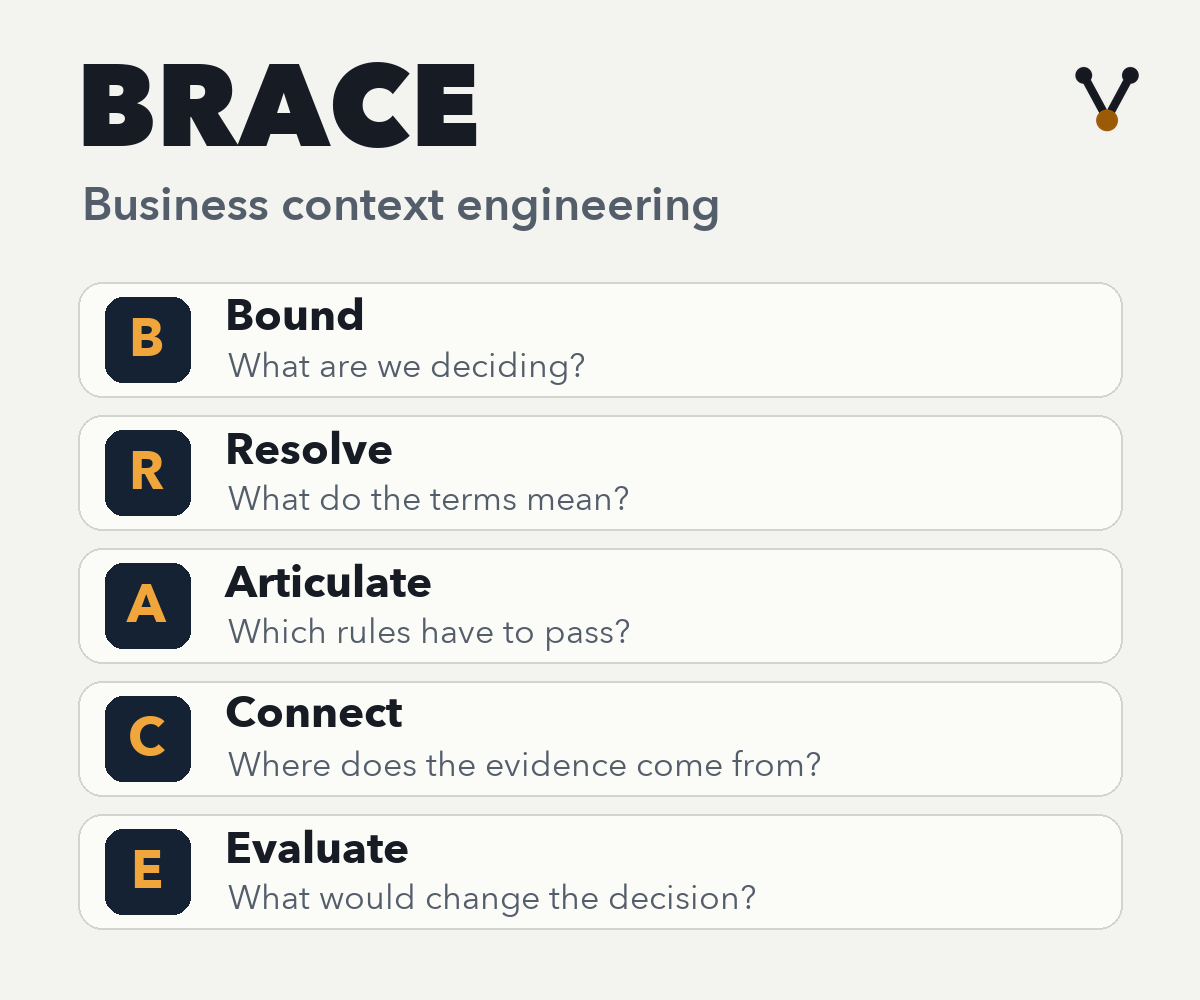
BRACE stands for Bound, Resolve, Articulate, Connect and Evaluate. Use it when people need to agree on the definitions, rules and evidence behind a business decision. A replenishment team could use it to decide where to send inventory. A support team could use it to decide when to escalate a case.
For the promotion, I’d use it before the first run to decide where the offer can run and how to measure it. After the first run, it gives the team a way to decide whether to test further, revise the offer or expand it.
B — Bound the decision
Before launch, the category manager might ask, “Which 20 stores can run this offer, and what would count as a good result?” After seeing the prior-week comparison, the question becomes, “What would justify sending it to 200 more?”
For this offer, the goal is to improve the contribution from bagged coffee after accounting for the cost of running the promotion. The category manager owns the go-ahead. Finance owns the measure of profit, Pricing checks the offer, and Replenishment checks whether stores can carry the forecast demand. Put the objective, offer and target stores in the decision brief along with the dates.
Implementation example
I’d turn that brief into an evaluate_promotion request with a campaign_id, offer_version, target_store_group_id and the proposed dates. In plan mode, it checks whether the stores can run the offer and retrieves the approved success measure. In review mode, it also checks what the campaign evidence supports.
R — Resolve business meaning
If shoppers bought the discounted bag instead of another bag the store sells at a better margin, the featured item can look good while the aisle earns less. For this example, Merchandising defines the category as bagged whole-bean and ground coffee. Pods and instant coffee sit in separate categories.
- Glossary. The $1,000 is an observed gain in gross profit on the featured coffee compared with the previous week. Incremental category gross profit estimates how much the offer added across bagged coffee compared with regular pricing.
- Taxonomy. Pin the bagged-coffee category version across both periods. If a whole-bean SKU moves into that category halfway through, applying a different definition to each week can make the move look like growth.
- Ontology. Link the $18 offer to the eligible SKUs, stores and dates. Link each return to its original sale so it lands in the right comparison period.
- Semantic model. Calculate gross profit from net sales after discounts and returns, less the cost of goods sold. Account for campaign costs and eligible supplier funding when calculating contribution for the rollout decision.
Implementation example
Publish a daily_sku_sales view with one row per store_id, sku_id and trading_date. Use SUM(net_sales) - SUM(cost_of_goods_sold) for the featured SKU or for all SKUs in the approved category. Track whether the sale lines have approved costs before aggregating. Flag gross profit for verification when a cost is missing.
A — Articulate the rules
Before a wider rollout, I’d ask Finance to look at what the category stands to earn from the offer. Start with the estimated gain in bagged-coffee gross profit against regular pricing. Subtract extra campaign costs, such as paid placements or store displays. Include the additional funding the retailer expects to earn under an approved supplier deal because of this offer. Gross profit already captures any portion reflected in product cost, so add only the rest. This gives Finance the incremental contribution to compare with its approved target for the proposed offer and store group.
Suppose the trial ran at $18. Some of the proposed stores let shoppers use a loyalty coupon on top of the offer. Pricing needs to check what those shoppers would pay. Analytics needs to decide whether a test at $18 still tells us enough about those stores.
| Campaign evidence | What I’d ask the agent to recommend |
|---|---|
| The only evidence is the prior-week comparison | Plan a controlled test. |
| The proposed terms or stores fall outside the approved test, or a required input is missing | Flag the gap for verification. |
| The approved contribution range is entirely below Finance’s target | Pause expansion on those terms. |
| The lower end of the range is below the target and the upper end reaches or exceeds it | Hold expansion and check whether more evidence could resolve the uncertainty. |
| The lower end of the range meets Finance’s target | The evidence supports expansion in the covered store group. |
A campaign can meet Finance’s target and still be hard to run at a particular store. I’d ask for these store checks before including a location in the first test or the rollout.
| Store check | What to verify |
|---|---|
| Offer setup | Verify the approved SKU and pack size, the store and channel, and the dates. Simulate the register price with any loyalty offers or coupons that can be combined under the policy. |
| Margin | Apply the store’s approved cost to the simulated checkout price. Compare the resulting margin with Pricing’s floor for the category and channel. Send exceptions to Pricing for a decision. |
| Stock | Start with sellable stock after existing commitments. Project it day by day using demand and dated, confirmed receipts. Check that the store can meet demand and keep any shelf stock the policy requires. |
Say the offer runs Friday through Monday. The forecast shows enough stock for all four days once Monday’s delivery is included. The store is still projected to run out on Saturday. I’d leave that store off the proposed dates and ask Replenishment when it can run the offer.
Implementation example
Resolve the campaign’s eligible costs and funding, check that the approved test applies to the proposed terms, and load Finance’s target from the applicable policy version. In this example, the policy compares the lower end of the accepted contribution range with the target. Both use the same unit, such as dollars per store per week.
CASE
    WHEN evidence_type = 'prior_week' THEN 'plan_controlled_test'
    WHEN evidence_type IS NULL OR evidence_type <> 'approved_test'
      OR contribution_lower IS NULL OR contribution_upper IS NULL
      OR contribution_lower > contribution_upper
      OR contribution_target IS NULL THEN 'needs_verification'
    WHEN contribution_upper < contribution_target THEN 'pause_expansion'
    WHEN contribution_lower >= contribution_target THEN 'supports_expansion'
    ELSE 'hold_expansion'
END AS campaign_status
Run the register, margin and stock checks separately for each store. The response can say that the test supports expansion and name the stores that can run it. If none can, report why and leave the ready-store list empty.
C — Connect to evidence
A curated sales view in the data lakehouse can tell the agent what each store sold each day. The decision also needs a contract that identifies the offer version, the target stores and the policy that governs the recommendation. That contract lets the service use the same lakehouse records for a sales comparison or a rollout review, with the evidence labeled for the decision at hand.
| Evidence | What I’d connect |
|---|---|
| Sales, returns and costs | Sales lines, their associated returns and the approved cost effective on the sale date. Use a consistent cutoff for late returns. |
| Products and category | SKU and pack identifiers, plus the approved bagged-coffee category version used for both periods. |
| Offer and test | Campaign calendar, approved offer version, register prices after discounts, and test and comparison store assignments. |
| Campaign costs and supplier deals | Approved campaign spend and funding terms, including the items, locations and dates the deal covers. Reconcile funding with the cost records. |
| Store supply | Sellable stock, dated confirmed inbound receipts and projected demand through the offer. |
For a controlled test, group comparable stores and randomly assign stores within those groups to the offer or regular pricing. Use the same measurement window across both groups. Agree with Finance on what goes into the contribution measure and what evidence would justify expansion before looking at the results.
Implementation example
Roll up returns by original_sale_line_id before joining them to sales. Two partial returns can otherwise repeat the original sale in the join. In the read-only evaluate_promotion tool, return the observed metrics with their store and date scope, plus campaign_status, store_assessments, policy_version and source references the caller is allowed to see. The $1,000 change is labeled prior_week and belongs to the original 20 stores. Store readiness for the proposed 200 comes from their own pricing and supply records.
E — Evaluate and evolve
Ask the category manager to write down the answer they’d expect if the evidence supports expansion and a store can’t run the offer on the requested dates. Then check that the agent can explain both facts in one reply.
Implementation example
Use a one-store fixture to test the agent’s reply after the campaign and store checks have run.
{
  "case": "saturday_stockout",
  "input_snapshot": {
    "campaign_status": "supports_expansion",
    "offer_window": "Friday through Monday",
    "store_assessments": [{
      "store_id": "store_042",
      "status": "not_ready",
      "projected_stockout": "Saturday",
      "next_confirmed_receipt": "Monday"
    }]
  },
  "expected_decision": {
    "campaign_status": "supports_expansion",
    "ready_store_ids": [],
    "reason": "stockout_before_receipt"
  }
}
The agent should explain that the evidence supports expansion and the proposed store will run short before its Monday delivery. I’d also test the original 20-store comparison when zero stores are ready for the follow-up, a loyalty coupon that takes margin below the floor, and supplier funding that shows up in both product cost and the deal file. When the lower bound meets Finance’s target exactly, expect supports_expansion. When the lower bound falls below the target and the upper bound reaches it, expect hold_expansion. Save the input snapshots and policy version so the team can replay the cases after a change.
In the first few reviews, I’d put the output next to the category manager’s working notes. If the tool excluded a store that the manager included, find out whether the difference came from the rule, a receipt date or information the manager had that the tool never received. That gives the team something specific to fix.
Start with a decision your dashboard already informs
Pick one offer someone has to approve this month. Bring the campaign view, the pricing setup and the stock plan to the same conversation. Ask the category manager to show the team a store they would include and one they would leave out. Write down why. That gives you two cases you can check against the data and use to start building the business context.
The retailer, campaign figures and policies are illustrative. The views are my own.